

If you've ever typed a keyword into Reddit's search bar and felt overwhelmed by the flood of irrelevant results, you're not alone. Most founders give up there. But the real magic happens when you go beyond simple keywords and start using Reddit’s built-in search operators.
This is the difference between casting a giant, sloppy net and using a finely-tuned fishing rod. One gets you a boot full of mud; the other lands you a warm lead. For founders, this is how you find your next customer instead of wasting hours.
Unlocking Reddit's Advanced Search Operators

At BillyBuzz, we treat Reddit search less like browsing and more like a surgical operation. We're not looking for random posts. We’re hunting for specific conversations that signal buying intent, expose a competitor’s weakness, or reveal a customer’s biggest frustration.
The entire foundation of our strategy is built on mastering a few key search operators. By combining them, we build a specific, targeted query that only catches the conversations we actually care about. This approach is what transforms Reddit from a potential time-sink into a reliable engine for insights and leads.
Essential Reddit Search Operators We Actually Use
Forget those exhaustive lists with dozens of operators you'll never use. For finding real growth opportunities, you only need a handful of powerful ones. When combined, they give you incredible control over your search results.
This quick-reference table covers the operators that we find deliver 80% of the value. We've included a real-world example for how we'd use each one at BillyBuzz to find leads or monitor our brand.
| Operator | What It Does | BillyBuzz Use Case Example |
|---|---|---|
subreddit: |
Restricts your search to a single community. | subreddit:startups title:"how to get first users" |
title: |
Only searches the titles of posts. | title:"social media automation tools" |
selftext: |
Only searches the body of text-based posts. | selftext:"struggling to get traction" |
author: |
Searches for posts/comments by a specific user. | author:some_competitor_ceo or -author:automoderator |
flair: |
Filters posts by their assigned category flair. | subreddit:SaaS flair:"Looking for Tool" |
url: |
Finds posts that link to a specific domain or URL. | url:competitor.com |
site: |
The same as url:, just a different name. |
site:competitor.com |
Mastering these seven operators is the key to creating laser-focused queries that surface exactly what you're looking for, saving you countless hours of manual digging.
From Simple Keywords To Powerful Queries
Let's walk through a real-world transformation. A novice might search for something generic like "customer feedback tool." This is a recipe for disaster—you'll get thousands of ads, spammy posts, and irrelevant chatter from every corner of Reddit.
Here’s how we’d approach it at BillyBuzz. A starting query for us looks more like this:subreddit:SaaS selftext:("customer feedback tool" OR "user feedback software") flair:"Looking for Tool"
See the difference? This query instantly does three critical things:
- It zeros in on
r/SaaS, a community packed with our target audience. - It hunts for specific phrases that signal buying intent within the actual post content.
- It filters for posts where users have explicitly tagged their thread as "Looking for Tool."
The results are night and day. You're no longer sifting through garbage; you're looking at a curated list of direct requests for help from your ideal customers. This level of precision is why Reddit search is a cornerstone for so many savvy marketers. It's a massive platform—with over 2 million external websites linking to Reddit pages and an estimated 100 million keywords ranking in search engines, its influence is hard to ignore, as highlighted by Sprout Social.
At its core, mastering Reddit advanced search is about learning the language of your customer. You're not just searching for keywords; you're searching for problems, frustrations, and requests for help that your product can solve.
Finding High-Intent Leads with Precision Queries

Okay, you’ve got the core operators down. Now it’s time to turn that theory into actual revenue. We’re not just looking for brand mentions here; we're hunting for conversations at the exact moment a potential customer needs help. At BillyBuzz, we’ve built our entire lead gen process around a few core query frameworks that consistently dig up these high-intent discussions.
The real secret is getting into the user's mindset. People on Reddit don't use marketing jargon when they're looking for a solution. They describe their problems, complain about the tools they're stuck with, and ask for honest recommendations. Your job is to translate that everyday language into a razor-sharp reddit advanced search query.
This is the difference between interrupting a conversation and being invited into one. When you show up with a genuinely helpful answer to a direct question, you’re not a spammer—you’re an expert.
Finding Users Asking for Product Recommendations
This is the lowest-hanging fruit and your most direct path to a warm lead. People flock to niche subreddits for unfiltered advice from others who've already solved the same problem. Your goal is to pinpoint these explicit requests for help.
First, identify the right communities. At BillyBuzz, we focus on r/saas, r/startups, and r/marketing. From there, you build a query that looks for clear buying signals.
BillyBuzz Query Template: Recommendationssubreddit:saas selftext:("looking for" OR "recommendation" OR "alternative to" OR "any suggestions for") AND ("social media monitoring" OR "brand monitoring") -author:automoderator
This query is effective because it:
- Targets a specific subreddit where your ideal customers gather.
- Scans post text for phrases that signal an active hunt for a new tool.
- Narrows the search to your product category.
- Crucially, it filters out the noise from automated moderator posts with
-author:automoderator.
The most powerful queries combine a specific location (
subreddit:), a user's intent (selftext:"looking for"), and the problem you solve ("brand monitoring"). This simple formula is the backbone of effective lead discovery.
Identifying People Complaining About a Competitor
Every complaint about a competitor is an open door. A user frustrated with their current software is already thinking about switching, which makes them an incredibly high-quality lead if you can offer a better experience.
The trick is to find these conversations without coming off as predatory. You're here to listen, and only when it’s appropriate, offer a helpful alternative.
BillyBuzz Query Template: Competitor Pain Pointssubreddit:saas (mention OR hootsuite) AND (slow OR crashing OR "bad support" OR expensive OR bug)
Here, we're looking for our competitor’s name right next to common frustrations. This helps us find people who aren't just mentioning a competitor but are actively fed up. When we find these threads, our strategy is never to bash the other company. Instead, we acknowledge their frustration and gently introduce our tool as an alternative that directly addresses their specific complaint.
Locating Discussions About a Specific Problem
Sometimes, the best leads don't mention any tools at all. They just describe a problem that your product was built to solve. These people might not even know a solution like yours exists, making this a perfect opportunity for education-based marketing.
For this, you have to think like your customer. What words would they use to describe their biggest challenge? If you sell a social media scheduling tool, they might talk about "wasting time posting" or the nightmare of "managing multiple accounts."
BillyBuzz Query Template: Problem Discoveryselftext:("struggling with" OR "how do you manage" OR "is there an easier way to") AND ("social media mentions" OR "tracking keywords")
This query is intentionally broader and isn't locked to a single subreddit. It’s focused entirely on the language of the problem itself. Once you've honed these skills, you can apply the same strategic thinking elsewhere. For a more comprehensive look, check out this excellent guide on generating leads effectively across social media platforms.
By building your search habits around these three scenarios—recommendations, competitor pain points, and problem discovery—you create a systematic process for finding leads. Of course, running these searches manually gets old fast. The next step is setting up a system to track this stuff automatically.
Keeping an Eye on Competitors and Brand Mentions
Let’s be real: your competitors' customers are on Reddit, and they are definitely talking. The question is, are you listening? This goes way beyond just looking for sales leads. A smart Reddit search strategy is one of the best ways to get real-time market intelligence. It's where you can gauge sentiment, spot trends before they go mainstream, and find genuine opportunities to help users who are hitting a wall with a rival's product.
At BillyBuzz, our monitoring process is more than just typing a brand name into the search bar. We craft very specific queries to catch everything—not just direct mentions, but common misspellings, product names, and most importantly, conversations where frustration is brewing. This kind of proactive listening is how we figure out where competitors are dropping the ball and where we can step in.
Building Your Competitor Monitoring Query
Simply searching for competitor_name is a recipe for information overload. You’ll be drowning in a sea of news, official announcements, and fan posts. We need to find the signal in all that noise—the authentic user feedback that gives you something to work with.
The trick is to combine the competitor's name with keywords that signal a problem or a negative experience. This helps us zero in on those crucial conversations where a user is fed up and might be open to an alternative.
Here's a foundational query template we use all the time. Feel free to copy and paste it, just swap in your competitor's details.
BillyBuzz Competitor Complaint Templateselftext:("CompetitorName" OR "Competitor Product A") AND (issue OR problem OR slow OR crashing OR error OR "customer service")
This query is so effective because it looks for two things at once:
- The mention of the competitor or one of their specific products.
- The context of a problem, thanks to a list of common complaint words.
Finding these threads gives you a direct pipeline into your rival's biggest weaknesses. You can see, in real-time, which features are buggy, where their support is falling short, and what pricing models are driving users away. This is gold for your own product roadmap and marketing messages.
The goal here isn't to jump into every thread and try to poach customers. It's to learn. When you see a user complaining that a competitor's tool is "too slow," that’s a direct signal to start highlighting your product's speed in your own marketing.
Filtering Out the Noise for a Clearer Signal
Once you have your base query, the next step is to clean up the results. A common problem is seeing posts from the competitor themselves, like official announcements or support threads started by their own team. That's not what we're after.
We use negative operators to get rid of this clutter. The -author: operator will quickly become your best friend.
-author:CompetitorUsername- This excludes posts from their official Reddit account.-author:automoderator- This is great for removing automated posts that can muddy your results.-title:"official"- This helps filter out threads that are probably just company announcements.
Putting it all together, our refined query might look something like this:(CompetitorName OR CompetitorProduct) AND (frustrating OR unreliable OR bug) -author:CompetitorUsername -author:automoderator
This kind of systematic filtering means you spend your time analyzing real user conversations, not sifting through corporate fluff. For a deeper look at this process, our guide on how to monitor competitors on social media offers a broader framework you can apply well beyond just Reddit.
It's also worth noting that Reddit's own search capabilities have gotten a huge boost lately. Since Google's recent deal with Reddit, you'll see Reddit threads popping up constantly in search results, especially for queries that start with "how to" or "what is the best." This partnership has massively increased Reddit's search visibility, often letting it outrank niche blogs. A well-crafted monitoring strategy is now more valuable than ever.
Automating Your Reddit Search with Alerts
Let's be real: manually running your killer Reddit search queries every day just isn't going to work long-term. As a founder, your time is everything. Spending it hitting refresh on a search page is a recipe for burnout, not business growth.
This is where automation becomes your secret weapon. It transforms that manual, time-sucking chore into a consistent, hands-off system for finding leads and tracking competitors.
At BillyBuzz, we've built our entire outreach process around this idea. Instead of being glued to the search bar, we turn our most effective queries into real-time alerts. This means we're often one of the first to jump into a relevant thread, offer real help, and build our brand—all without dedicating hours to manual scrolling.
Choosing Your Automation Tool
First things first, you need a tool that can take those perfectly crafted search strings and turn them into notifications. There are a few options out there, but the core function you're looking for is simple: monitor Reddit for specific keywords and phrases, then ping you on a platform your team actually uses, like Slack or email.
This is exactly why we built BillyBuzz. It takes the complex queries we've been working on and puts them on autopilot. But honestly, whatever tool you pick, the goal is the same. You need to shift from active searching to passive monitoring.
This simple diagram shows our internal workflow, which is powered entirely by automated alerts.
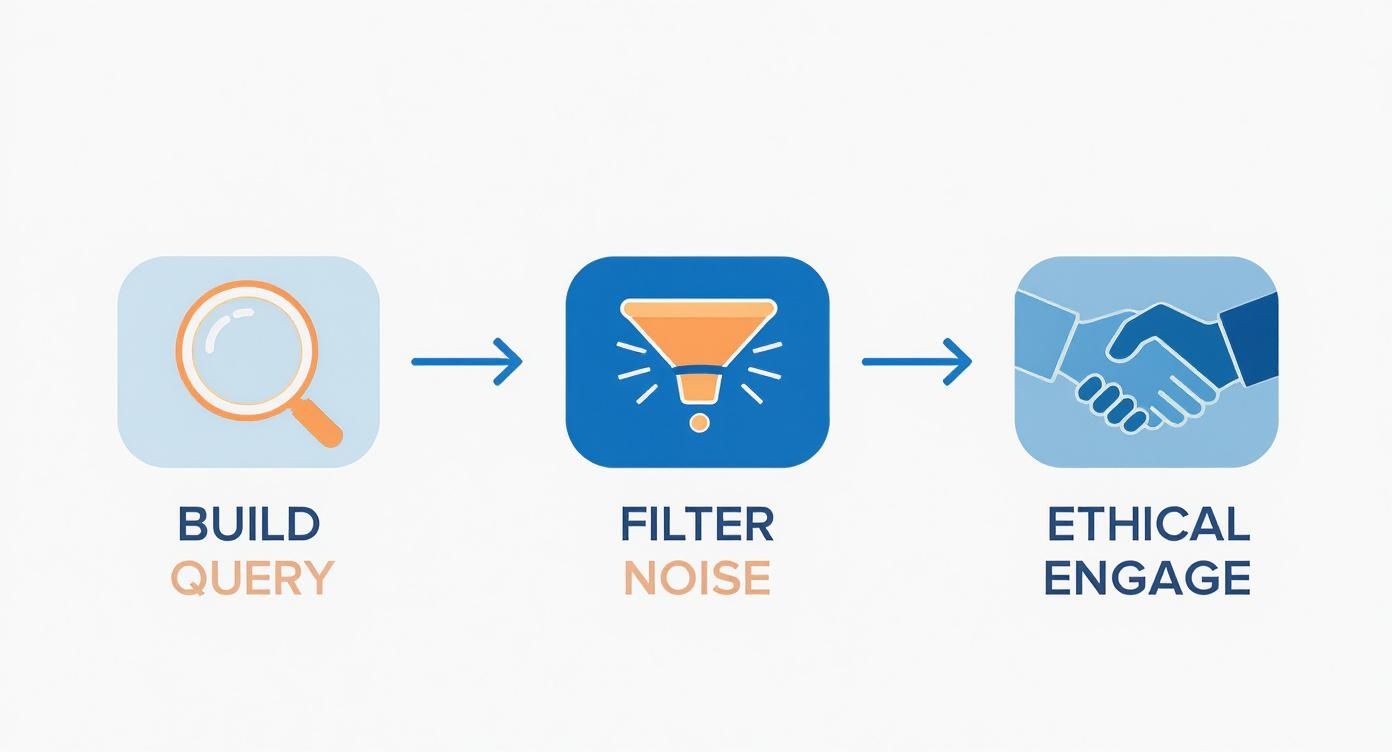
The big takeaway here is how automation connects your intelligence gathering (the query) directly to your outreach (the engagement). It closes the loop and makes the whole process faster and way more efficient.
Our Internal Alert Rules and Response Templates
Setting up an alert is easy. Setting up a good alert—one that doesn't flood your Slack with junk—takes more thought. Your goal is a high signal-to-noise ratio.
Here are the exact alert rules we use inside BillyBuzz:
- Target Subreddits: We stick to a curated list:
r/saas,r/startups,r/growmybusiness,r/marketing,r/socialmedia. That's it. No more. - Use Precise Keyword Triggers: Our core trigger is
("looking for" OR "alternative to" OR "recommend") AND ("social media monitoring" OR "brand monitoring" OR "reddit alerts"). - Apply Aggressive Negative Keywords: We filter out "free," "job," "hiring," "internship," and "career." We also add
-BillyBuzzto our lead-gen alerts to separate new prospects from existing customer chats.
When an alert hits our #reddit-leads Slack channel, we have two primary response templates. The key is to always add value first.
Template 1: Direct Recommendation Request
"Hey [username], saw you were looking for a tool for [problem]. A few good options for this are [Competitor 1], [Competitor 2], and my own tool, BillyBuzz.
The main difference is [your key differentiator, e.g., "we focus specifically on Reddit/Slack integration"]. If that's a priority for you, might be worth a look. Happy to answer any questions either way!"
Template 2: Competitor Pain Point
"Ugh, that sounds frustrating. I've heard others mention [specific issue] with [Competitor] before.
Not to just plug my own stuff, but we built BillyBuzz to solve that exact problem. Our [specific feature] is designed to [prevent the pain point]. If you decide to look for alternatives, feel free to check us out. Good luck!"
For a full breakdown, check out our guide on how to set up Slack alerts for Reddit mentions in 10 minutes. This simple integration turns a notification into an actionable task for the team.
Expanding Your Search Beyond Native Tools
https://www.youtube.com/embed/n2v_6mwS1GU
Reddit's own search is what I use for most day-to-day monitoring, especially when I need to see what's happening right now. But let's be real—it's not perfect. It can get buggy, return inconsistent results, and sometimes it completely fails to surface older, but still incredibly relevant, conversations.
When that happens, you need a backup plan. A solid search strategy can't rely on a single point of failure. Here's our contingency plan for when native search lets us down, ensuring we can still find the information we need, no matter what the platform throws at us.
This isn't about ditching Reddit's search entirely. It's about knowing which tool is right for the job and always having a reliable alternative in your back pocket.
Pivoting to Google for Broader Discovery
When Reddit's search misses the mark, my first move is to jump over to Google. Using the site: operator is a surprisingly effective workaround for digging up threads that Reddit’s internal algorithm might have buried, especially when it comes to historical data.
The query structure is simple but powerful. Instead of searching on Reddit, you go to Google and type:
site:reddit.com "your advanced query here"
For example, if I was looking for discussions about social media scheduling tools and Reddit's search was timing out, my Google query would look like this:
site:reddit.com/r/SaaS "social media scheduling tool" "recommendation"
Google’s indexing is often far more robust and can unearth posts from years ago that have high authority but are lost to Reddit’s default sorting. I use this method all the time for deep-dive research into a competitor's history or to find those foundational, must-read posts in a new subreddit I'm exploring. It’s my primary tool for any kind of archival search.
Don’t give up on a search just because Reddit's native tool fails. A quick switch to a
site:reddit.comGoogle query can often reveal exactly what you were looking for in seconds. It’s the simplest, most effective Plan B.
The Evolving World of Third-Party Search Engines
For years, the community leaned heavily on third-party search engines that indexed Reddit's entire history with incredible precision. These tools were absolute gold for deep historical analysis, letting you search for specific comments and posts with a level of detail that even Google couldn’t match.
However, recent changes to Reddit's API access have hit these external tools hard. Many have either shut down or become far less reliable, which has pushed most of us back toward native tools and Google. This context is important because it really underscores the need for a multi-pronged approach. You just can't depend on one method anymore.
While the ecosystem of dedicated Reddit search engines is in flux, the core principle hasn't changed: the API is still the most powerful way to conduct deep analysis. If you have development resources, interacting directly with the Reddit API is the ultimate way to extract data. But for most of us, a combination of native search and Google's site: operator provides the best balance of power and accessibility. To get a better handle on the bigger picture, you can also use a free Reddit analytics tool to monitor subreddit activity and user engagement patterns.
Building a Resilient Search Strategy
Ultimately, the key is to think like a founder and build a resilient system. You wouldn't bet your company on a single marketing channel, so don't build your intelligence gathering on a single search tool.
Here’s a simple breakdown of how we approach it:
- For real-time results and alerts: We stick with Reddit's native search, often piped through an automation tool. This is non-negotiable for speed and catching conversations as they happen.
- For broad discovery and archival research: We use Google's
site:reddit.comoperator. It’s our go-to for finding older, authoritative threads that native search completely misses. - For deep data analysis: When a major research project demands it, we look to tools that can still tap into the Reddit API for the most comprehensive data extraction possible.
By understanding the strengths and weaknesses of each method, you can adapt on the fly. If one tool isn't working, you have two others ready to go. This flexibility is what separates a casual searcher from a strategic operator who consistently finds valuable insights.
Common Reddit Advanced Search Questions
As founders, we've sunk countless hours into figuring out Reddit's search quirks. It wasn't always pretty. So, we've pulled together the most common questions we get from other entrepreneurs, along with the straight-up answers we learned from being in the trenches. This is the stuff that lets you skip the painful trial-and-error phase.
Why Is My Search Query Returning No Results?
This is the big one. The most common frustration, by far. You craft what feels like the perfect query, hit enter, and... crickets. Nothing.
I can tell you that 90% of the time, the culprit is a simple syntax error or a misunderstanding of how Reddit’s search logic actually works.
When a query fails, here's the exact troubleshooting checklist we run through at BillyBuzz:
- Check for typos. Seriously. A simple slip like
subredit:instead ofsubreddit:will kill the whole thing. Go back and check every single operator and keyword. - Simplify the query. Strip it down. Start removing operators one by one until it works. Does it pull results with just the
subreddit:andselftext:parts? This is the fastest way to isolate what's breaking it. - Broaden your keywords. You might be getting way too specific. If you’re searching for
"social media scheduling software", try something more general like"social media tool"or even just"scheduling tool". People often use simpler, broader terms to describe their problems.
How Can I Find a Specific Comment?
This one’s a bit tricky. Reddit's built-in search is really geared toward finding posts, not the individual comments buried inside them. There's no magic operator to just search for comments.
Your best bet? If you happen to know which post the comment is in, just navigate to that post and use your browser’s find function (Ctrl+F or Cmd+F).
If you don't know the post, it's time to step outside of Reddit. Use Google and its site:reddit.com operator. Google often does a much better job of indexing and surfacing individual comments that match your keywords.
Are Reddit Search Results Always Chronological?
Nope, and this is a huge detail that trips people up. By default, Reddit sorts all search results by Relevance. It's trying to show you what it thinks is the "best" match, which often means you're looking at popular threads from months or even years ago.
For finding new leads or monitoring brand mentions, that’s completely useless. You need to see what’s happening now.
Always, always, always change the "Sort by" filter to New. This is a non-negotiable step for us. It’s the only way to ensure you’re seeing fresh opportunities and not stale conversations.
Making that one simple switch from "Relevance" to "New" is probably the single most impactful change you can make to your entire Reddit search workflow. It's the difference between finding a cold lead and jumping into a conversation happening in real-time.
Stop wasting time manually searching for leads. BillyBuzz uses AI to monitor Reddit for you, sending real-time alerts for high-intent conversations directly to your Slack or email. Find your next customer on Reddit today.